

Version History
Click here to review known issues.
1.1.0.31 (16 December 2025)
- You can now choose between the original full size layout and our brand new compact layout. Read more here.
- We added image libraries (premium users only). Read more here.
- We updated the overlay icon window to use image libraries (premium users only). Read more here.
- We updated the inset image feature to use image libraries (premium users only). Read more here.
- We added image search (premium users only; requires that you purchase search credits; $2 = 100 searches of up to 50 images). Read more here.
- We added a customizable gradient to the standard folder icon. Read more here. Note: The original gradient icon style is now called Fixed gradient to distinguish it from this new customizable gradient option.
- To help clear up confusion and ensure everything works as expected, the "open image as folder icon" (custom folder image) quick button has been updated to behave the same as the "import image to icon styles" button. Going forward, simply select your custom image from the "Icon styles" tab. (Premium users only).
- We updated the align to grid icons in the overlay icon window with icons.
- We fixed an issue where enabling and disabling the Mac icon style disabled cover images for premium users (required changing icon styles/restarting the app again).
- We fixed an issue where when selecting a new cover image and "fit entire image" is checked, the preview did not update.
- We fixed an issue where selecting the native icon reverted to a white color in the advanced color mixer.
- We fixed an issue where the advanced color mixer had shown a normal folder icon when the generic, flat or open folder styles were selected.
- We fixed an issue where clearing an overlay icon on a native icon reverted to a white color.
- We fixed an issue where when selecting a cover image, followed by clearing the cover image and then reselecting a new cover image, the new cover image did not take effect.
- We fixed an issue where clearing the cover image, and then choosing a new cover image / resetting the existing cover image, does not enable to 'clear' button.
- We fixed an issue where the advanced color mixer reverted to white when using an inset icon.
1.1.0.30 (30/05/2025)
- We updated the context menu. You can still send the selected folders to the app, but you can now also select your default color , restore the native icon, or choose from up to 8 of your most recent colors. See here for more details. The new context menu implementation requires .NET 8.0 Runtime.
- We updated the color wheel with a more refined look and feel.
- Starting with version 1.1.0.30, you can change the ALT-Q and ALT-W hotkeys:
Click "Change" next to the "Enable Windows Explorer hotkeys" option.
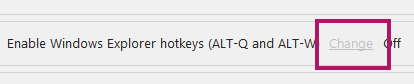
Then specify your preferred hotkeys:
Join hundreds of thousands of users in personalizing your Windows PC like never before!

- We made a few more improvements to help enhance color accuracy when using the Advanced Color Mixer and when using the new context menu items.
- We fixed an issue with 'Add folder' on the 'Manage folders' tab not working.
- We fixed an issue with the progress bar when adding over 2000 folders at a time.
- We fixed a refresh issue when first running the app in dark mode and going to the new icon styles tab.
- We fixed an issue getting the selected folders from Windows Explorer when clicking the target.
- We fixed an issue on the Advanced Color Mixer where opening a color file resulted in enabling the dropper tool.
- We fixed an issue on the Tools tab where 'Restart Explorer' does not always restart Explorer.
- We made a few more performance enhancements. As a result, the app now requires 64 bit Windows.
1.1.0.29 (03/05/2025)
- New & improved
- We added an option for premium users to flip the overlay icon.
- We added icon styles. Freeware users can use the built-in icon styles. Premium users can also add their own custom images. See here for more details.
- We added an option for premium users to keep the aspect ratio of the selected image when choosing a custom image for the overlay icon.
- We added a "Clear cover image" button.
- We added an option to disable coloring custom folder images.
- Service updates
- We fixed an issue where the default palette loads white into all color swatches until the palette is manually reselected
- We fixed an issue where the warning lines stay visible when clearing the overlay icon.
- We significantly optimized performance of the app when selecting images up to 30mb for overlay icons, inset images and cover images. This will be particularly noticeable when resizing the overlay icon. We are testing performance of the app with images larger than 30mb.
- We fixed an issue with SQLite that triggered an error when enabling the folder database and applying icons on some computers.
- We fixed an issue with cover images where it is no longer possible to uncheck "Zoom and fit selected area" without checking "Fit entire image".
- We fixed an issue where the color tiles disappear when prompted to if you would like to save your changes and you click 'No'.
- We fixed an issue where selecting an icon file that contains multiple sizes, the overlay/inset icon is distorted in some cases.
- We fixed an issue where the icon reverts to the native icon when the new Mac style is enabled and you select an overlay icon.
- We fixed an issue where the folder icon reverts to the native icon when applying a custom image in some cases.
- We fixed an issue where exporting an IDA file for any of the default folder styles includes a copy of the last used custom image.
1.1.0.28 (05/04/2025)
New & improved
- We added a flat folder icon. Premium users can add inset images to flat folder icons.
- We added the ability for premium users to use their own folder icons. You can add overlay icons to custom folder icons.
- We added a drop shadows to overlay icons (optional; premium users only).
- We added a Mac icon style. Premium users can add overlay icons to Mac style icons.
- You can now flip your icon horizontally (premium users only).
Service updates
- We fixed an issue with and optimized the HEX field on the Advanced Color Mixer and tweaked/optimized the color mixer.
- We fixed an issue with the folder database when right clicking and sending folders to the app.
- We fixed an issue where the app generates a startup profile in the parent folder when right clicking and sending folders to the app.
- We fixed another PayPal issue.
- We fixed an issue where cancelling applying an icon to a large number of folders "hangs" the app and does not always cancel.
- We fixed an issue where the app prompts to confirm twice when applying an icon to a large number of folders.
- We further optimized the cover image feature.
- We're changing the number of days between license verifications from 14 days to 30 days.
1.1.0.27 (21/2/2025)
This is a service update. We fixed an issue with PayPal payments only.
1.1.0.26 (18/2/2025)
This is mostly a service update.
- We added the generic content folder icon used by Windows.
- We added button to quickly create a blank palette (instead of having to clear all the color tiles one by one).
- We're now showing a progress bar when working with many folders.
- In this update, we're also making available for public testing an experimental feature that lets you backup your folder customizations on one computer running Windows 11 Folder Color Changer, and restore it to another, where the folders are in the same location. Read more here.
1.1.0.25 (10/1/2025)
This is mostly a service update:
- We added a few more optimizations. The performance gain is between 0.5 and 1 second.
- We fixed a few minor issues affecting free users.
- We fixed the issue where the folder color is darker than the selected color in the color mixer.
- We fixed a few incorrect tooltips.
- We fixed the service message alert that ignores dark mode.
1.1.0.24 (1/1/2025)

- Service updates & changes
- App launch time has been optimized further. Expect a 3-6 second performance gain depending on your computer configuration.
- We updated the “Unlock more features” window and removed the “popup” when trying to use any of the premium features for freeware users. This is to make the app more “nag”-free.
- The EXE file increased in size for this update because we added both light and dark mode slides to the “Unlock more features” window to showcase the premium features.
- We updated 3rd party DLLs.
- Due to the click-and-hold on palettes misbehaving, we disabled click-and-hold, and reverted to click once to select the swatch, and long-click to open the color mixer (single click on an empty swatch will still open the color mixer).
- We fixed an issue with the preview icon “flashing” and/or slowly refreshing when quickly moving around the color wheel when an overlay / inset icon is selected.
- Selecting a cover image or inset image now correctly updates the last selected path.
- We fixed another issue where the app will not reactivate on Validating the license or when re-entering a valid product key for some users.
- We fixed an issue where only the main window runs in dark mode and all subsequent windows without any theme whatsoever.
- We added tooltips to all major controls. We also fixed the tooltips on the folder list that stopped working.
- When sending our team the Settings file, we now prompt for more information.
- We fixed an issue where the freeware version maintains a log file about the UID/SID not being found (these only apply to the licensed version) for some users.
- We’re bringing in a file size limit of 30mb for cover, inset and overlay images. This is to prevent the app from hanging due to processing large image sizes. The maximum folder icon size supported by this app is 256×256. There is no reason to use too high quality images as the detail will be lost in any case once we scale down your image. For reasonable performance, we recommend using images under 10mb, and for best performance, we recommend images under 5mb. Use your favorite image editor to edit/resize your preferred image.
- We made improvements to the Quick pick and Folder list in dark mode.
- We fixed an issue where the overlay icon can overshoot the right or bottom boundaries when holding the controls
- We changed “Apply selected icon/color” to “Apply icon to folder(s)”
- To help troubleshoot activation issues, we added a button to test the app’s internet connectivity on the Tools tab (privacy note: this test simply pings the foldercolorchanger.com website).
- We further optimized the icon quality for both the standard icon and the open folder icon.
- In addition, we now include all the major icon sizes within the .ico file.
- Service messages are now organized by date.
New & Improved
- We added a gradient style icon. See Gradient style folder icons.
- We signficantly reworked the cover images feature. As a result, we changed “Select cover image” to “Customize cover image” on the main app interface. See Improved cover images.
- We added a size indicator to the overlay image slider.
When approaching the limit in the overlay icon designer, the red warning line is now shown only for the applicable boundary.
We renamed “Validate license” to “Manage license”, which now opens a window containing license specific tools. Of importance here is that you can now deactivate your license on the current computer to open up a license slot for activation on another computer.