
Starting with version 1.1.0.25, Windows 11 Folder Color Changer employs basic telemetry to enhance user experience and ensure the software remains reliable and user-focused. This telemetry helps us identify errors, identify performance issues, understand which features free users are exploring, and analyze the most-used features among paid users. This data allows us to address issues promptly and prioritize feature enhancements based on user interest.
We do not collect any data on the folders (including any folder names) that you customize, or their content, whatsoever; only on those features of Windows 11 Folder Color Changer that you use.
As part of this telemetry, Windows 11 Folder Color Changer collects certain technical details. We do not collect your IP address, and none of this information can be used to personally identify you. In the instance where you named your computer “Johns-PC”, we might incidentally derive from this that your name is “John”.
For full transparency, you can review our privacy notice.
What does this telemetry look like?
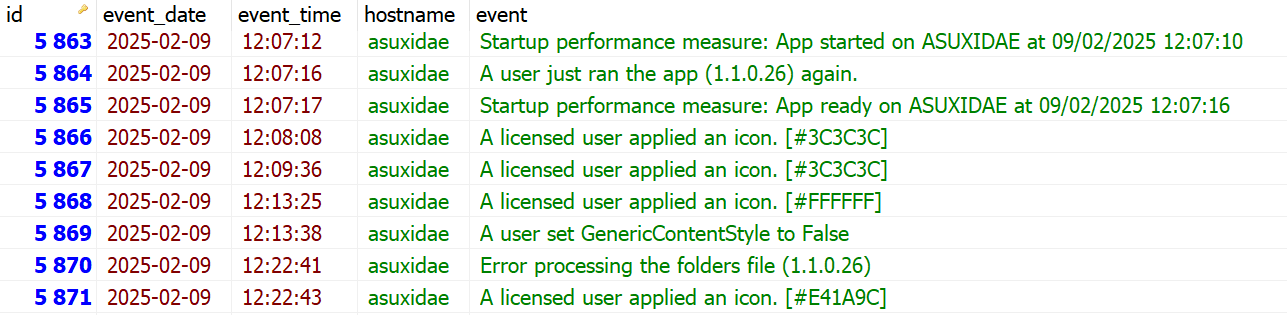
Here’s an extract from our telemetry log. It should be evident that our telemetry is of an entirely general nature, intended only for statistical purposes and to identify errors and performance issues.
If you nonetheless prefer not to share even such basic telemetry with us, or otherwise experience performance issues, you can turn on “Disable basic telemetry functionality within the app” under Options.