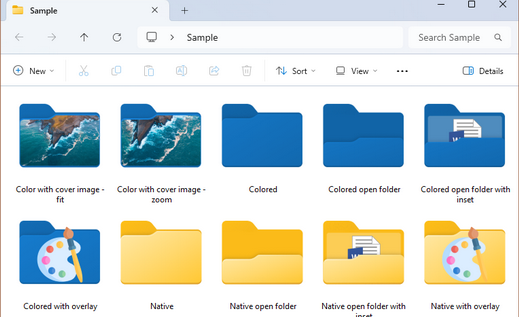
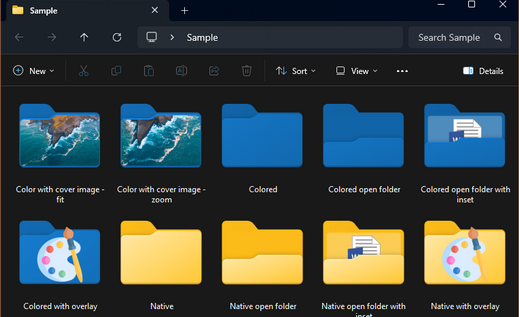
Note: Freeware and Lite users do not have access to cover images Starting with version 1.1.0.24, we’re introducing a new way to customize cover images for your folders. By selecting “Fit entire image (stretch)”, you can (still) create an ordinary...

Welcome to Windows 11 Folder Color Changer
Join hundreds of thousands of users in personalizing your Windows PC like never before!
Premium version: $6 (includes all features)
Lite version: $3 (includes only the advanced color mixer)
(license fee is once-off for up to 5 devices)
We respectfully ask that new users refrain from filing a PayPal case should you not
receive a product key right away after payment. E-mails do get delayed from time to time.
Please reach out to our team for assistance. We are most happy to assist you.
CURRENT VERSION: 1.1.0.31 RELEASE DATE: 16 DECEMBER 2025
Works on Windows 10 & Windows 11
Supports network folders
REACTIVATION FOLLOWING UPDATE
Updating to version 1.1.0.23 regrettably resets the Settings file for some users. As a result, your license is reverted to the Freeware version. Kindly re-activate with your Product Key and send an e-mail to support@foldercolorchanger.com and we’ll reset the...
NEW: Improved palettes
Note: Freeware and Lite users do not have access to color palettes Starting with version 1.1.0.23, you can now mix up to 20 colors per palette Click to select or long-click an existing color swatch to open that color in the advanced color mixer Click + on an empty...
License fee increased on 30 November 2024
Please note: The $4 license fee has increased to $6 on November 30, 2024 (perpetual, up to 5 concurrent installs/activations). Our ever expanding feature set remains in OUR LICENSE IS PERMANENT; PAYMENT IS ONCE-OFF. THIS IS NOT A MONTHLY OR ANNUAL SUBSCRIPTION. In...
NEW: Save your icon designs!
Note: Freeware and Lite users do not have access to this feature. Starting with version 1.1.0.21, you can now save and open your icon designs for later re-use, fine-tuning, copying to another computer, or sharing with another Windows 11 Folder Color Changer user. The...
NEW: Eye dropper tool
Note: Freeware users do not have access to the Advanced Color Mixer. We’ve added a basic eye dropper tool to the advanced color...
NEW: Full size inset images
Note: Freeware and Lite users do not have access this feature. You can now use the new “Full size inset image” setting to choose between the standard inset image (ideal for icons, e.g. document types) and full size inset image (ideal for image folders e.g....
NEW: Support for network folders
We’re happy to let you know that you we’ve added one of the most requested features, namely support for network folders (this feature is still in public testing; let us know if you encounter any difficulties). For this to work properly, on client PCs, you...
Introducing color palettes!
Note: Freeware users do not have access to color palettes. Version 1.1.0.18 of Windows 11 Folder Color Changer brings color palettes. Choose from more than twenty pre-set color palettes or create your own! To select a palette color, simply click on the color tile. Or,...